
Ship what matters. Show customers you're listening.
Create roadmap items from real feedback. Prioritize with value-vs-effort scoring, upvote-driven and revenue signals, public and private roadmaps, and a branded portal that's yours.
Rohith Reddy, Co-founder at ResumeUp.AI
The Problem
Your backlog is full. Your customers are frustrated. Your team is guessing.
Sound familiar? You have hundreds of feature requests piling up, your inbox is full of "when is X coming?", and every sprint planning session turns into a debate with no clear winner.
How it works
Every roadmap item traces back to a real customer need.
ProductBridge closes the loop between what your customers ask for and what your team builds.
01
Customers submit feedback
Users share ideas and pain points through your branded portal. No forms, no email threads. Just one place for everything.
02
The community votes
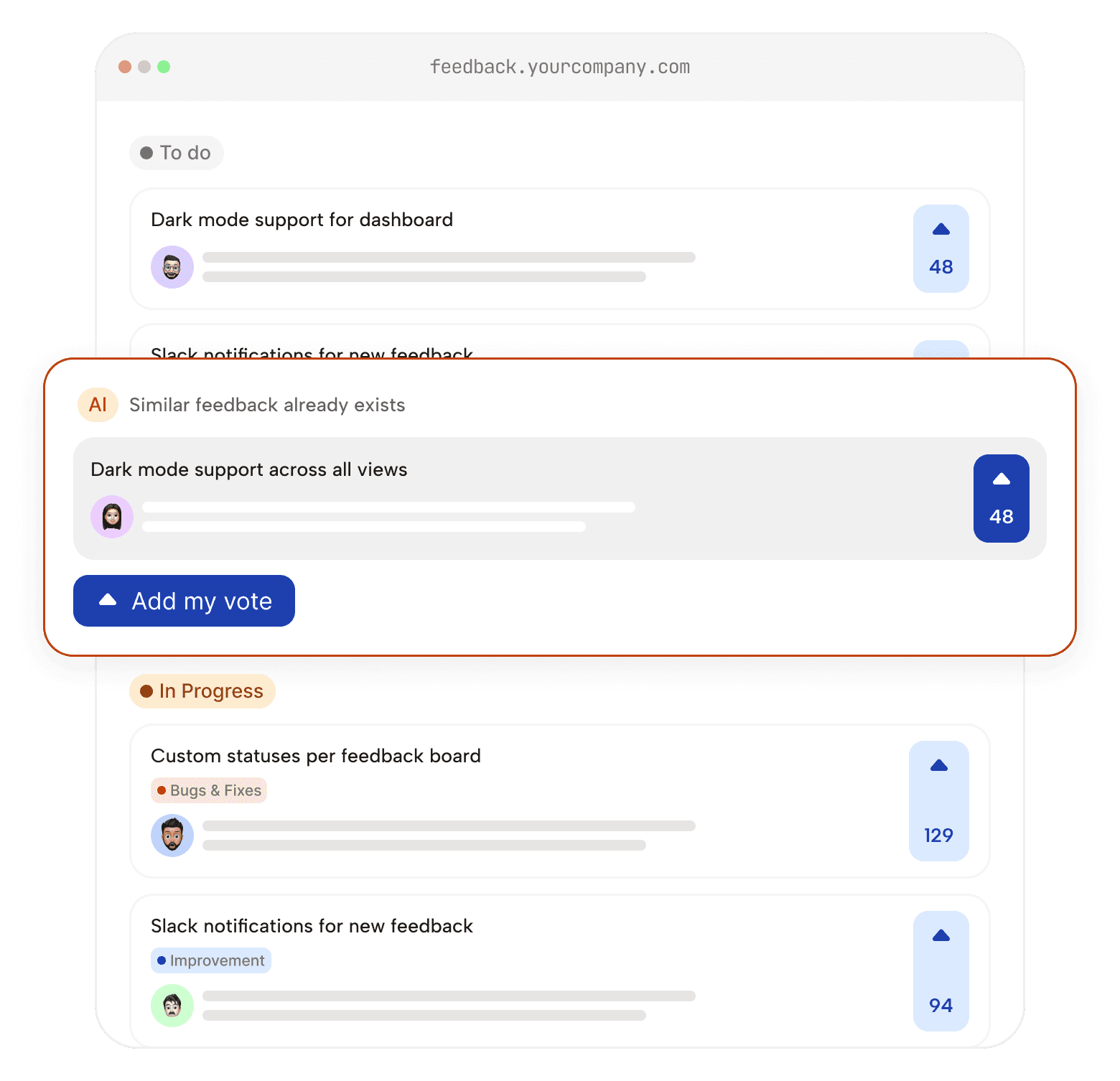
Other users upvote what matters to them. You see which ideas have real traction — not just whoever emailed you the most.
03
Your team scores and prioritizes
Assign Value vs. Effort scores to each request. Filter and rank by your highest-value users to surface what actually deserves to move forward.
04
Create roadmap items directly from feedback
One click converts top-voted feedback into a roadmap item. No copy-pasting. Original votes and comments stay linked.
05
Publish and keep customers in the loop
Move items through your kanban as work progresses. Voters get notified on status changes. No more "is this still happening?" emails.
Prioritization
The smartest product roadmap tool has prioritization built in — not bolted on.
Great product decisions are grounded in data. ProductBridge gives your team two powerful lenses to cut through the noise.
Upvote-driven demand signals
Every vote is a data point. See which features your users are most passionate about, segment votes by user type or plan, and surface the ideas with the most momentum.
Value vs. Effort scoring
Not all high-vote features are worth building next. Rate each roadmap item by the value it delivers against the effort required. High value, low effort? That's your next sprint.
Your roadmap, your domain, your rules.
Give your customers a dedicated space to see what you're building — on your own branded URL. No generic third-party links. Just your brand and your credibility.
Roadmap

Custom Dashboards you requested is now live! Start personalizing your workspace.
Launch your public product roadmap at roadmap.yourcompany.com. Two minutes to set up, feels native to your product.
Public and private roadmaps
Keep internal planning boards private while sharing customer-facing roadmaps externally. Set visibility per roadmap.
Multiple roadmaps
Running more than one product? Create separate roadmaps for mobile vs. web, enterprise vs. self-serve, and more.
Granular visibility controls
Choose which items are public, internal-only, or visible to specific segments. Build trust without overpromising.
Organized the way your team actually thinks.
A roadmap is only useful if your team can navigate it in seconds. ProductBridge gives you the structure to keep everything tidy — no matter how big the backlog gets.
Kanban board view
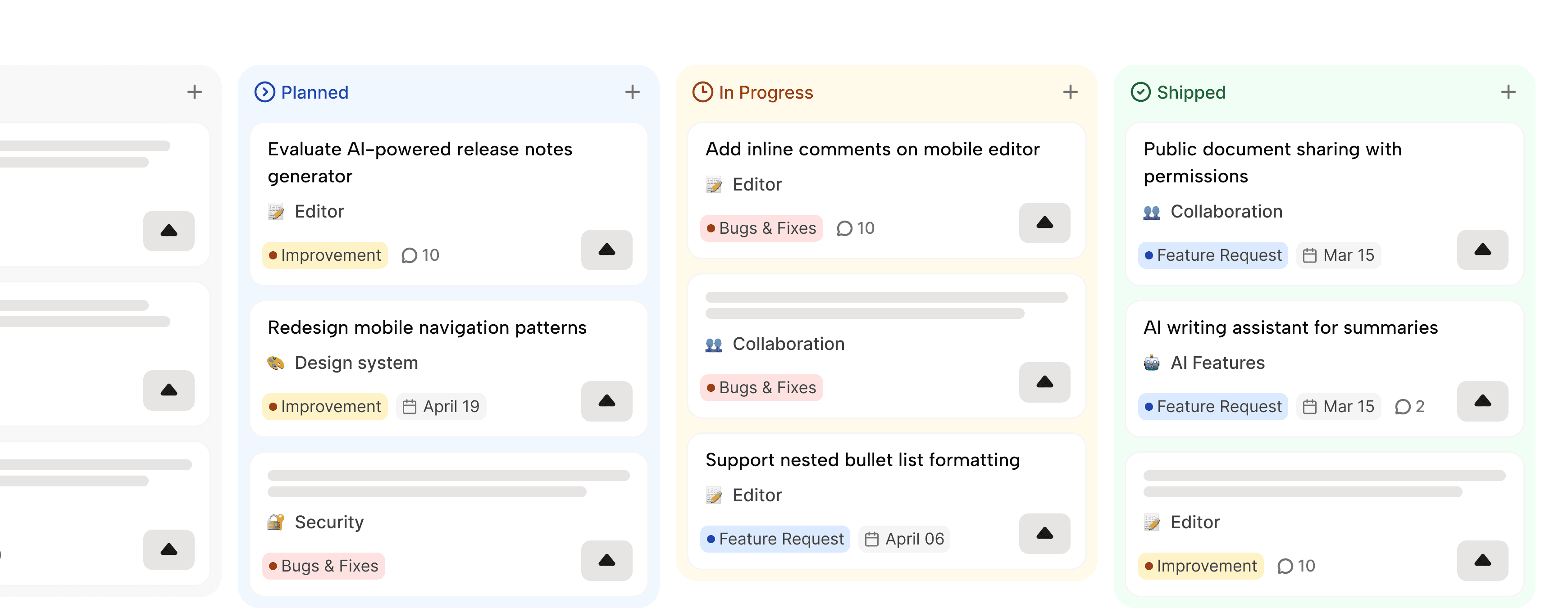
See every roadmap item at a glance, organized by status. Drag and drop items as they move from Planned to In Progress to Shipped. Your team gets a shared view — no spreadsheet needed.
Flexible status management
Define the statuses that match your workflow. Under Review, Building, In Beta, Shipped — or whatever fits how your team works. Status changes notify the customers who care.
Categories and tags
Organize items by product area, team, customer segment, or release milestone. Filter the board to see exactly what you need. Tags make search instant, categories keep strategy clear.
Rich commenting and discussion
Every roadmap item has its own discussion thread. Customers can comment and ask questions. Your team can respond publicly or keep notes internal. It's a two-way conversation, not a broadcast.

Frequently asked questions
Everything you need to know about the ProductBridge roadmap feature.
What is a product roadmap tool?
A product roadmap tool is a platform that helps product teams plan, visualize, and communicate the product development plan to the teams and end-users. The product roadmap shows which features are currently planned, in progress, and shipped. ProductBridge's roadmap tool allows you to go beyond the basic visualization and directly link roadmap items to customer feedback, so product teams can build features based on the real feedback rather than assumptions.
How does ProductBridge turn feedback into a product roadmap?
ProductBridge allows you to collect feedback from different sources and aggregate it in a dashboard. The product team can convert top-voted, or most revenue generated requests to a roadmap item with a single click and assign it to the team to build it. The original feedback remain linked, so the customers will be in the loop during the various phases of product building - creating a transparent connection between the user and the product direction.
Can I create both public and private roadmaps?
Yes, ProductBridge supports both public and private roadmaps. Public roadmaps are visible to all users with the status of each of the roadmap items. Private roadmaps are restricted to the internal teams. ProductBridge also supports segment-based roadmap visibility, allowing you to showcase different roadmaps to different user segments. Unlimited roadmaps are available on all plans.
How does prioritization scoring work?
Each roadmap item can be assigned a Value score (how much impact will this deliver?) and an Effort score (how much work does it require?). Combined with upvote data from your users, this gives your team a clear, objective basis for deciding what to build next. No more gut-feel debates.
What custom statuses can I use on my ProductBridge roadmap?
ProductBridge supports fully customizable status workflows for roadmaps. Default statuses include Planned, In Progress, In Review, and Shipped, but teams can create custom statuses according to requirements. You can also configure the email notifications to users upon changing the status, keeping the customers informed about the progress.
Can I use my own domain for the roadmap?
Absolutely. You can publish your public roadmap at any subdomain you control—for example, roadmap.yourcompany.com. Setup takes just a few minutes with a simple DNS change.
How many roadmaps can I create?
This depends on your plan. Most paid plans support multiple roadmaps, letting you create separate boards for different products, teams, or customer segments.
How does ProductBridge compare to Productboard and Canny for roadmapping?
ProductBridge gives you a complete, connected workflow (feedback → scoring → roadmap → customer notification) at a fraction of the cost, with no training required at $24/month flat for unlimited users. Canny charges ~$579/month at 1,000 tracked users. Productboard charges $59/maker/month with no built-in changelog. ProductBridge also helps turn customer feedback into actionable product intelligence. ProductBridge AI identifies trends, surfaces high-impact priorities, and answers plain-language questions like "What do enterprise users complain about most?"
Is there a free plan?
Yes. ProductBridge offers a free plan so you can explore the product and set up your first roadmap without a credit card. You can upgrade when you're ready for advanced features like custom domains, multiple roadmaps, and priority support.
What integrations does ProductBridge support?
ProductBridge integrates with Jira, Linear, GitHub, Slack, and more—so your team can keep working in the tools they already use while ProductBridge manages the customer-facing side. Data flows in both ways, so your product and development teams always stay in sync without manual updates.
Start building what your customers actually want.
Set up your public roadmap in minutes. Collect real feedback. Prioritize with confidence. Ship with purpose.
Free plan available · Setup in under 5 minutes · Cancel anytime